
Concept To Code
Launching an Air Defense MVP
Lead Product Designer | U.S. Air Force | Jan 2020-2021
Note: This case study has been sanitized to remove sensitive information, with select details and images blurred or redacted in accordance with security requirements.
Mission 🎯
Airmen relied on manual tools like PowerPoint to stitch together complex defense strategies — wasting time, creating fatigue, and hindering decision-making in joint operations.
Scope: End-to-end UX — discovery through delivery
Challenge
- No dedicated defense visualization tool
- Highly complex, multi-dimensional data
- Classified environment + COVID travel restriction
- No existing workflows or codebase
Approach
- Applied Double Diamond (Discovery → Framing → Design → Delivery)
- Conducted interviews with Air Force SMEs & prospective users
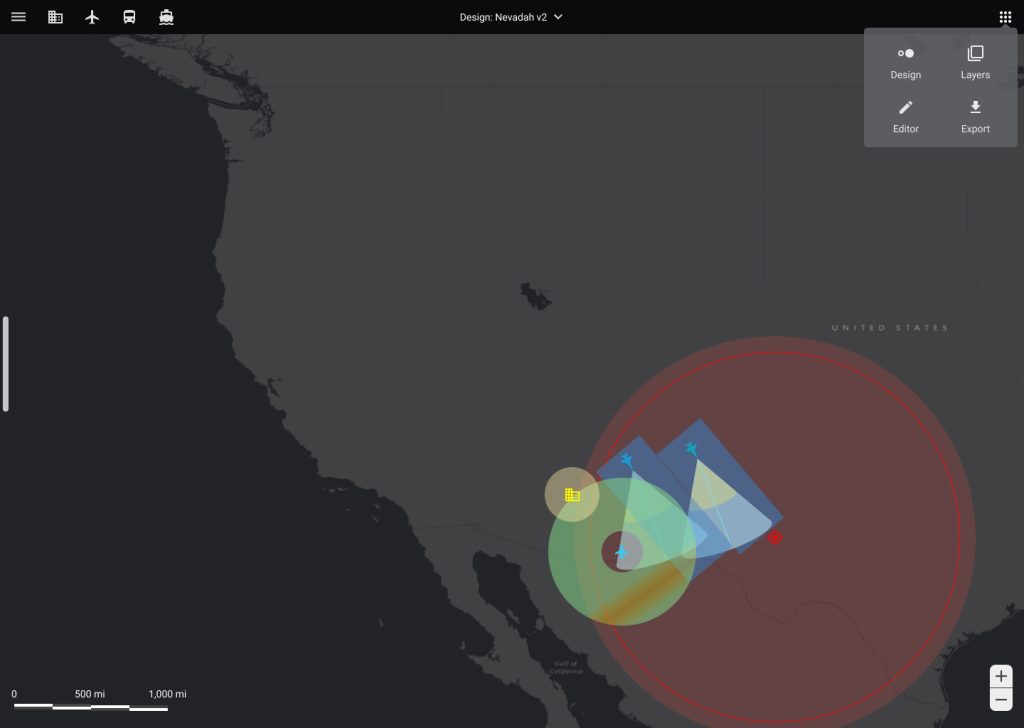
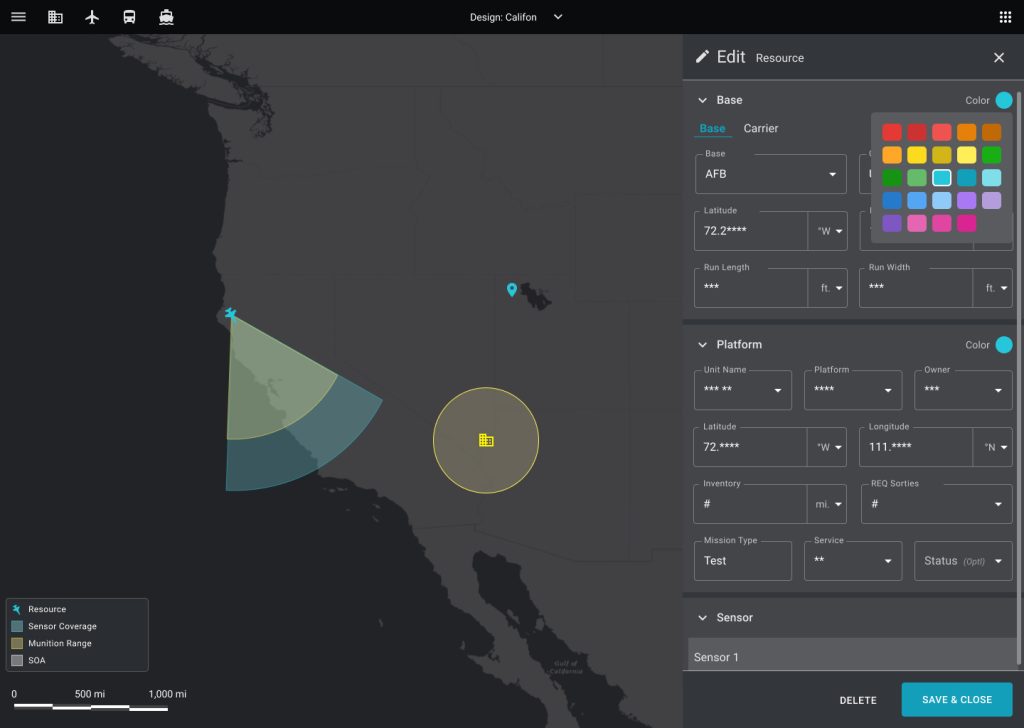
- Designed map-based interface with layers, markers & measurement tools
- Facilitated async feedback cycles with Airmen
Impact
- Unified interface for joint operations planning
- Cut artifact & briefing creation time by 50%
- Improved clarity, accuracy & alignment across air, land, and sea forces
- Delivered a high-fidelity MVP adopted for planning

Reflection
Wins: Streamlined defense planning, reduced manual process
Challenges: Limited user access, shifting leadership priorities
Next Time: Ensure long-term product vision before launch
Learn More
Diving into the details....
Concept to Code
Outcome
- Enable Cohesive Defense strategy and planning for Joint Operations
- Improve clarity, accuracy and decision-making by streamlining multiple visual sources into a single, cohesive interface & unify information into a single visual experience
- Reduce artifact and briefing creation times by 50%Improve visual accuracy
Scope
Produce End-to-end UX Design from discovery to product delivery & the continuation of feature development
Agency & Users
Duration
January 2020-2021
Product Team
1 Project Manager
6 Engineers
2 USAF SME
1 Product Designer
My Role: Lead Product Designer
Mission & Challenges
Operational Problem
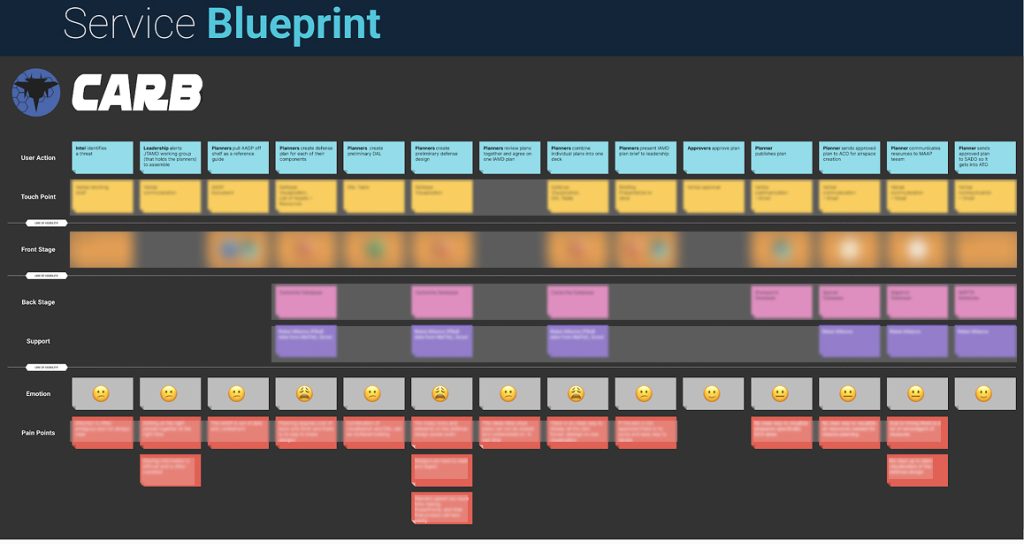
Airmen lacked software tooling to generate comprehensive operational visualizations, forcing planners to manually stitch together fragmented artifacts. This resulted in excessive time spent creating incomplete strategy visuals, leading to mental fatigue, subjective interpretation, and difficulty identifying misalignments across joint forces — ultimately this hindered informed decision-making and timely plan adjustments.
Why it mattered
Airmen were spending excessive time manually producing multiple visualization artifacts, which slowed planning and increased cognitive strain. Without a unified design, teams struggled to see the complete operational picture, making it harder to detect gaps, validate plans, and align strategy across forces.

Success Criteria
- Minimize time required to create visualizations
- Increase precision and reliability of visual outputs
- Deliver a consistent and unified visualization experience for users
Constraints
- Work conducted with classified data, limiting accessibility and shareability
- Legacy system provided no functional codebase or supported workflows to build from
- Limited access to external datasets for validation and testing
- Covid restrictions prevented in-person observation and travel for user research
Discovery Research
Approach
Using the Double Diamond Process
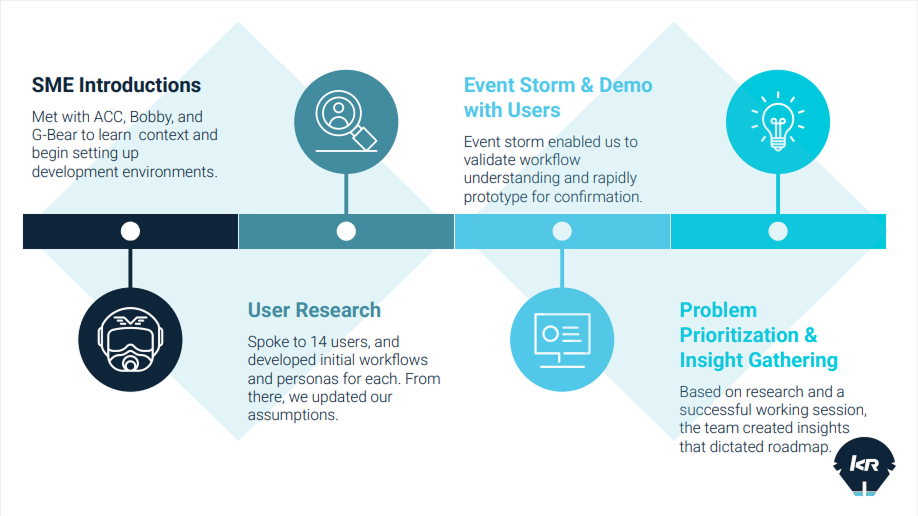
During the Discover phase of the Double Diamond process, our goal was to gain a deep understanding of the current operational landscape and the Airmen’s day-to-day workflows. We conducted interviews with prospective users and Air Force SMEs to uncover pain points, identify gaps in the existing visualization process, and build empathy with the people performing this work. These conversations helped surface themes around fragmented tools, cognitive overload, and difficulties communicating intent across teams. This foundational research enabled us to clearly frame the core problem and define opportunities for a more unified and efficient visualization solution.
Problem
Solution
Discovery
Define
Develop
Deliver
Insights
Challenges
- Airmen did not have a dedicated tool and were reliant on presentation tools like powerpoint to generate defense artifacts. Understanding their process, workflow and problem space was imperative in determining the type of product interface, interactions and capabilities we would need to design and develop
- Airmen were designing defense plans that needed to be displayed as a visual image artifact including air defense assets and joint resources from the army, navy and marines.
- One primary issue was that the stagenet flat images they were creating couldn’t capture a cohesive battle picture and often lacked accurate perspective of threat and asset placements
- Availability of airmen was limited
- We were unable to travel to worksites due to COVID 19 restrictions
- A previous legacy effort had failed & prior knowledge was limited
- There was no dedicated tool or database to work from (started from scratch
- The data we needed to visualize was detailed, intricate and complex ideally seen from a 3 dimension perspective

“ I’m looking for a system that facilitates the planning and vizualization of geographically based architectures. The system should enable the integration of multiple layers of defense and provide a means to communicate these integrated plans visually. ” – DANI, IAMD Plans Persona
Problem Framing
Problem Statement
Airmen lacked tools to create comprehensive operational visualizations, forcing manual workarounds that consumed time, caused mental fatigue, and made it difficult to detect misalignments—hindering decision-making and timely adjustments.
–“Without proper tools, Airmen stitched visuals by hand—slowing decisions, causing fatigue, and obscuring misalignments.”–
Core Jobs To Be Done Use Cases
Primary User
- IAMD Planner (Pilots)
- Generate defense designs that visually depict joint defense operations & levels of plans
- Reference different design versions and associated data
- Overlay different plans and perspective for joint operations (air, land & sea)
Design Objectives
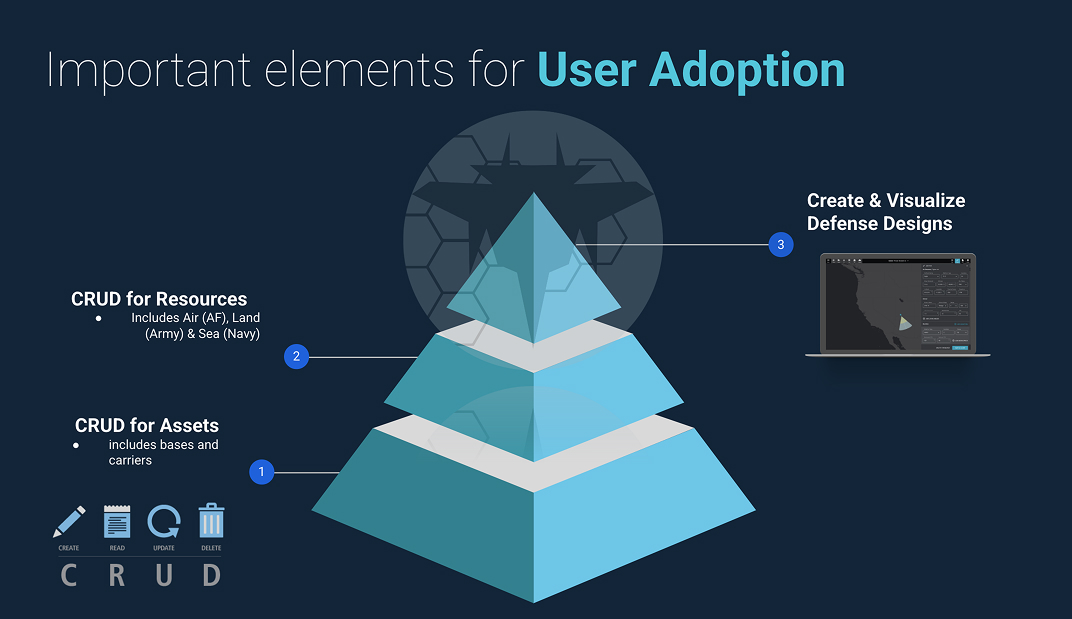
- Introduce a map interface with standard components and interactions
- Introduce the capability to add symbols, markers and points of interest
- Introduce basic CRUD interactions
- Introduce a file storage content area to support different versions
- Introduce measurement & perspective tools
- Introduce the ability to enter and tag to to symbols or markers on the map
- Add form fields to capture data
Design Strategy & Exploration
UI Designs
Users needed a way to explore maps, annotate points of interest, and capture detailed context without losing focus. I designed a Figma-inspired map interface with a central canvas for visual exploration and a side panel to tag markers, fill out forms, and manage associated data in real time. Features like versioning, CRUD operations, and measurement tools supported iterative workflows and precise analysis. By connecting visualization and documentation in a single interface, the design reduced friction, streamlined decision-making, and improved collaboration across joint forces.
Design for defense
Design Contribution &
Collaboration
Design
- Led UX strategy and stakeholder alignment
- Delivered a high-fidelity UI
- Facilitated async user engagement and continual engagement
Collaboration
- Worked directly with the airmen on a biweekly cadence to receive feedback, conduct prototype tests and determine adoption requirements
- Worked with product and engineering to determine user stories and deliver the product
Reflections
Outcomes &
Reflection
What worked
- Empowered defense teams with a tool tailored to their design workflows
- Streamlined processes by reducing manual work and saving time.
- Supported flexibility with the ability to manage multiple design versions.
Challenges
- Travel constraints limited in-person onsite observation and contextual research into users’ workflows
- Inability to fully staff the team created delivery delays and impacted product momentum
- Evolving leadership strategy led to uncertainty around how the product fit within the broader portfolio.
What we would do different
- Align the launch with a defined long-term vision strategy, ensuring the product integrates seamlessly into the broader suite rather than releasing prematurely.
Leadership Insight
- Ensure leadership alignment on a long-term product suite vision before moving forward with launch decisions.